UI Engineering in the Age of AI
Cross-platform Web UI was a good answer before AI. Writing code is cheaper now; verifying it is not. GPU UI and generating native apps for each platform both have an opening. We tested 10 frameworks.
OriginalNo reproduction in any form without permission
On 2025-12-12, Zed engineer mikayla-maki closed a PR proposing custom shaders for GPUI. The reply was polite. It thanked the contributor, then said: “we’re shifting focus to core product work at Zed, and without a Zed use case, I can’t validate this code”. It ended with a smiley.
GPUI is Zed’s own GPU UI framework. It often comes up in discussions of Electron alternatives. Less than four months earlier, Zed had announced a $32,000,000 round led by Sequoia, bringing its total funding past $42,000,000.
More than nine months later, on 2026-9-26, developer egoist created a repository called MyGo. After 39 days, it had 1,042 commits, 890 of them with Claude credited.
Claude comes from Anthropic. Anthropic’s own desktop app uses Electron.
Taken together, those three facts seem a little odd. We tested 10 frameworks on two machines to see where the field stands.
01Why We Tested
Electron is still used by desktop apps such as Claude and Codex: the Web has a mature ecosystem, one codebase can serve multiple platforms, and models know it well. AI reduces development costs, but cross-platform compatibility and maintenance still take work.
GPU-rendered UI offers another route, but GPUI still prioritizes Zed; cross-platform rendering and a widget ecosystem require sustained investment. MyGo shows how AI and ready-made components can accelerate a first version. Production maturity and long-term maintainability remain unproven.
Flutter, Compose, Slint, egui and iced make different tradeoffs. We tested 10 frameworks with the same scenarios, measuring smoothness, CPU, memory and visual fidelity to see what each approach actually costs.
02We Ran Local Tests
We tested 10 frameworks with the same scenarios on an Apple M4 Max and a ThinkPad T14 Gen6. Both platforms have CPU and memory measurements; Windows also has external frame measurements from PresentMon. Mac frame callbacks differ between frameworks and are not used for cross-framework comparison. Hardware and memory metrics differ too, so we compare frameworks only within each platform.
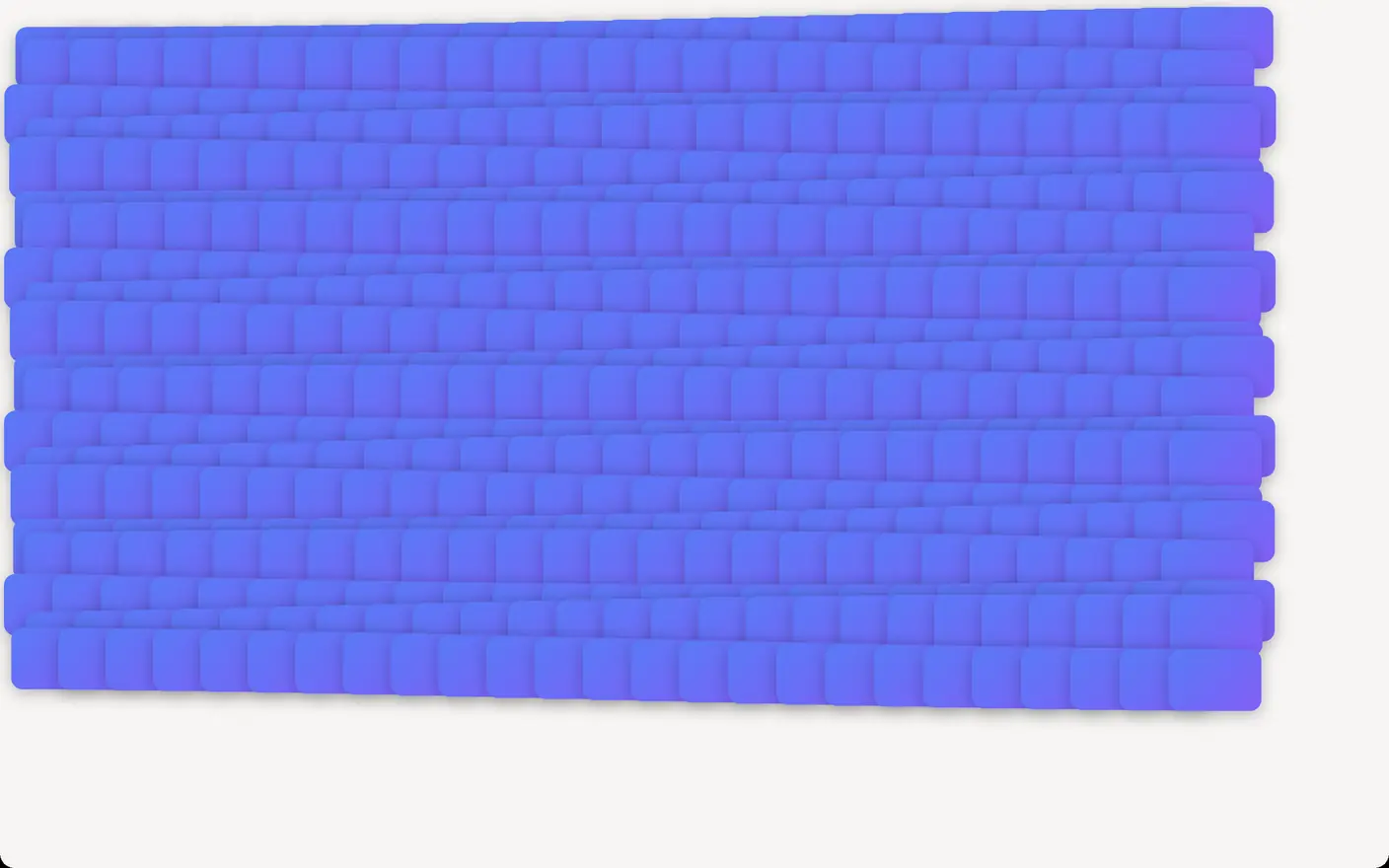
This is a dense animation workload: 500 cards, each 96×64 logical pixels, overlap in 25 columns. Each has a corner radius of 12, a 135° gradient and a shadow with blur 16 and vertical offset 4. All cards update their positions on frame callbacks, moving in circles of radius 12 with a four-second period. We run five 30-second rounds and report the median.
The main question is how much CPU the framework needs to update the UI, prepare drawing and submit rendering while many elements with visual effects move continuously, and whether it delivers frames consistently. CPU covers the application process tree; it is neither GPU utilization nor a breakdown of individual stages. Read it alongside frame intervals: producing fewer frames can also lower CPU use. The scene contains 500 cards, but occlusion and window clipping mean that not all 500 are drawn in full every frame.
Windows
| Framework | List frame | Motion frame | Stream CPU | Edit CPU | Motion CPU | Motion RAM |
|---|---|---|---|---|---|---|
| WPF (native) | 8.6 | 684 | 73% | 13% | 49% | 2,425 |
| Electron | 8.8 | 108 | 31% | 92% | 138% | 947 |
| Tauri | Invalid | 92 | 54% | 105% | 148% | 913 |
| GPUI | 8.6 | 16.7 | 24% | 4% | 22% | 142 |
| MyGo | 8.4 | 8.6 | 11% | 6% | 33% | 115 |
| egui | 8.8 | 8.5 | 12% | 20% | 49% | 388 |
| iced | 8.9 | 8.5 | 20% | 3% | 25% | 215 |
| Slint | 8.5 | 8.5 | 27% | 99% | 67% | 61 |
| Flutter | 8.4 | 80 | 22% | 105% | 91% | 4,934 |
| Compose | 8.8 | 160 | 34% | 106% | 102% | 2,422 |
All frameworks kept up with list scrolling. Motion exposed the gap: with 500 cards carrying shadows and gradients, the Rust and Go frameworks that draw their own UI mostly held 120Hz. Flutter, Electron, Tauri and Compose reached frame intervals of 80 to 160ms. WPF’s 684ms came from 500 separate shadow effects. Turning them off brought it back to 8.3ms, so this is not a general WPF problem.
Text editing is another hurdle. With 10 characters inserted per second into a 5,000-line document, Flutter, Compose and Slint all saturated one core. Flutter also lost thirty percent of the input on Windows.
Mac
| Framework | Stream CPU | Edit CPU | Motion CPU | List memory | Motion RAM |
|---|---|---|---|---|---|
| SwiftUI | 87.5% | 8.9% | 99.1% | 40 | 37 |
| Electron | 16.1% | 62.0% | 102.2% | 536 | 698 |
| Tauri | 42.1% | 86.9% | 78.7% | 753 | 555 |
| GPUI | 22.5% | 2.9% | 17.0% | 341 | 335 |
| MyGo | 8.2% | 2.8% | 16.3% | 368 | 371 |
| egui | 8.6% | 7.2% | 20.4% | 803 | 839 |
| iced | 18.2% | 7.5% | 15.0% | 489 | 491 |
| Slint | 18.4% | 52.1% | 26.7% | 423 | 416 |
| Flutter | 18.3% | 101.9% | 237.4% | 468 | 994 |
| Compose | 31.3% | 105.1% | 107.5% | 710 | 1,295 |
On Mac, animation CPU was about 15%–20% for GPUI, MyGo, egui and iced, versus 237% for Flutter and around 100% for Electron and Compose. During text editing, Flutter and Compose still approached one full core. Slint used 52%, below its 99% on Windows.
In the list scenario, SwiftUI’s roughly 40 MiB, GPUI’s 340 MiB and egui’s 800 MiB primarily describe application-process footprints. Native UI can use system rendering services outside the app: Apple documents AppKit’s preference for out-of-process layer-tree rendering, so some rendering and compositing work occurs elsewhere. Custom renderers also use system compositing, but app-process figures alone cannot compare how these paths divide the work. M-series unified memory means CPU and GPU share physical memory, not that all associated costs are charged to the app’s phys_footprint.
In five short GPU traces each for SwiftUI’s list and animation scenes, no GPU execution events were observed for the app PID, while WindowServer was active. This neither means SwiftUI uses no GPU nor attributes the whole desktop’s activity to it. WindowServer’s memory baseline fluctuated by about 205 MiB; the absence of large shared objects in snapshots also cannot rule out reuse of existing system resources. These results establish a lower application-process footprint for SwiftUI, not a lower total rendering cost or proof that the system pays the entire difference.
These numbers describe only these two machines, these versions and our test applications. Methods and full data are in section 05.
03It Was Never About Picking Just One
Editors, developer tools and business apps have different requirements for text input, animation, memory, cross-platform delivery and widget ecosystems. Each has its own use cases. Choosing a framework means deciding which tradeoffs are acceptable.
Many frameworks are also using retention, caching and partial updates to avoid repeating layout and drawing work. GPUI combines immediate and retained modes. The UI model, the work it can reuse and the time it takes to draw a frame are separate questions.
MyGo, iced, GPUI, Slint and egui all keep up with animation demands, with low CPU usage. Slint uses the least memory, egui’s memory use is relatively high, and GPUI requires you to supply your own editing controls. MyGo is currently used mainly by the author’s own apps and has not undergone extensive validation at production scale.
Flutter, Electron, and Compose also had poor frame intervals and resource usage in this animation stress test. Tauri’s package is just 11 MB, but its runtime memory use is similar to Electron’s.
04Verification Is the Bottleneck
We now think verification matters more than rendering.
Writing code has become cheaper. Confirming that it is correct still takes time. In the Stack Overflow 2025 developer survey, 66% had encountered AI solutions that were “almost right, but not quite”, and 45.2% said debugging AI code took more time. In a survey Sonar released in 01/2026, 96% of developers did not fully trust the functional correctness of AI-generated code, and only 48% said they always checked before committing. Sonar sells code inspection tools, so those figures deserve some caution, but they align with the earlier survey.
The Slint and egui releases attracted little attention. We think they matter more than the rendering advances. Agents need to inject input and take screenshots to make a change, look at it, then change it again. Checking an interface once meant someone sitting at a machine and clicking through it. Machines are now starting to take on that work.
There are three approaches for now. Cross-platform Web UI has the most resources at hand. Drawing UI directly on the GPU needs no browser alongside it, and the barrier to building it is lower than before. Native apps for each platform are the oldest approach. Once, only large companies could afford several teams. The difficulty now is the threefold increase in bugs and support scope that Breunig describes. If verification gets cheaper and quality improves, generating a native app directly for each platform could also work.
We are also exploring our own GPU UI approach. The difference is that we bring in much of the Web developer experience: JSX-like components, CSS-like styling, flexbox layout, reactive state and browser-style DevTools, all compiled to native code. It is still early.
We do not know which answer will win. Several may coexist for a long time. The three facts at the start still hold today. The PR remains closed, MyGo keeps growing, and Claude’s desktop app still uses Electron. It is a very interesting time.
05Test Report
Testing ran from November 4 to 6, 2026. Each framework implemented the same scenes using recommended practices, default settings and release builds. We reran Compose’s design page and the idle scene that shares its implementation after correcting the blur.
| Item | Mac | Windows |
|---|---|---|
| Machine | Apple M4 Max, 16 cores, 64 GB | ThinkPad T14 Gen6, Core Ultra 7 255H, Arc 140T integrated GPU, 32 GB |
| OS | macOS 26.4 | Windows 11 Pro 10.0.26300 |
| Display | Studio Display,60Hz,2x | 2880×1800,120Hz,200% |
| Window | 1440×900 logical pixels | 1280×720 logical pixels; borderless 1440×900 design page |
| Memory metric | phys_footprint | private commit (committed private memory, not physical usage) |
| Frame metric | Application callbacks; meanings vary by framework, not used for comparison | PresentMon 2.6.0 display intervals, externally measured |
| Machine state | Not idle; other development tasks running during tests | No other user activity |
| Framework | Version | Mac render path | Windows render path |
|---|---|---|---|
| SwiftUI / WPF | macOS 26.4 SDK / .NET Framework 4.8.1 | System compositing | WPF default D3D9 pipeline |
| Electron | 45.2.2 | Unverified | Chromium,ANGLE D3D11 |
| Tauri | 2.12.5 | WKWebView | WebView2 156,ANGLE D3D11 |
| GPUI | Zed c4273271 | Metal, defaults | Unverified |
| MyGo | 86ec3b30 | Unverified | Unverified |
| egui | eframe 0.37.0 | Metal | Vulkan |
| iced | 0.14.0 | Metal | Vulkan |
| Slint | 1.18.1 | FemtoVG,OpenGL | FemtoVG,OpenGL ES |
| Flutter | 3.47.9 | Impeller,Metal | Impeller,ANGLE D3D11 |
| Compose | 1.12.2 | Skiko,Metal | Skiko,D3D12 |
| Scenario | Workload |
|---|---|
| Idle | Show the design page, then leave it still to measure idle cost |
| List | 10,000-row virtualized list, row height 64, scrolling at a constant 2,000 px/s |
| Streaming | Load 200 past messages, then append 40 words per second to the last one, staying at the bottom |
| Editing | 5,000-line document, inserting 10 characters per second at the cursor |
| Motion | 500 cards, 96×64, corner radius 12, gradients and shadows, moving in circles using the same formula |
| Design page | 11 design specifications: fonts, shadows, hairlines, gradients, P3, background blur, corners, emoji, OpenType, mixed Chinese and English |
Each scenario ran 5 times per framework, 30 seconds per run, sequentially in shuffled order. All values below are medians. Across the 5 runs, the median range was about 3%; ninety percent were within 24%. List and motion tests were rerun after specifications were aligned, so the columns were not collected during the same period. CPU uses 100% for one logical core. Multiprocess apps include all child processes. For Tauri on Mac, we also counted the WebKit processes the system launched for it. Windows frame data uses only runs uniquely attributable to one swapchain with zero dropped records.
We checked actual delivered output for both streaming and editing. Flutter editing on Windows completed only 68%; all others exceeded 99%.
| Framework | Idle | List | Streaming | Editing | Motion |
|---|---|---|---|---|---|
| WPF | 2.6 | 37.2 | 72.7 | 13.5 | 49.3 |
| Electron | 6.1 | 42.8 | 30.6 | 92.1 | 137.8 |
| Tauri | 31.6 | 58.2 | 53.7 | 104.9 | 147.8 |
| GPUI | 1.5 | 10.6 | 24.3 | 3.6 | 21.5 |
| MyGo | 0.0 | 17.9 | 10.6 | 6.3 | 32.8 |
| egui | 0.3 | 15.9 | 12.2 | 19.6 | 48.9 |
| iced | 0.3 | 21.3 | 20.2 | 3.0 | 24.5 |
| Slint | 0.3 | 62.7 | 26.9 | 99.1 | 66.8 |
| Flutter | 0.6 | 31.2 | 21.8 | 104.6 | 90.6 |
| Compose | 0.5 | 35.9 | 34.4 | 106.4 | 101.8 |
| Framework | Idle | List | Streaming | Editing | Motion |
|---|---|---|---|---|---|
| WPF | 157 | 193 | 250 | 206 | 2,425 |
| Electron | 280 | 397 | 392 | 556 | 947 |
| Tauri | 260 | 313 | 346 | 536 | 913 |
| GPUI | 135 | 142 | 160 | 138 | 142 |
| MyGo | 132 | 135 | 133 | 132 | 115 |
| egui | 379 | 386 | 396 | 460 | 388 |
| iced | 212 | 224 | 274 | 321 | 215 |
| Slint | 79 | 87 | 72 | 202 | 61 |
| Flutter | 636 | 396 | 374 | 667 | 4,934 |
| Compose | 421 | 544 | 574 | 3,372 | 2,422 |
| Framework | List p95 | List p99 | Runs | Motion p95 | Motion p99 | Runs |
|---|---|---|---|---|---|---|
| WPF | 8.6 | 8.7 | 5 | 684.3 | 719.3 | 5 |
| Electron | 8.8 | 8.9 | 4 | 108.3 | 115.9 | 2 |
| Tauri | — | — | 0 | 91.7 | 100.0 | 5 |
| GPUI | 8.6 | 8.8 | 5 | 16.7 | 25.1 | 5 |
| MyGo | 8.4 | 8.7 | 5 | 8.6 | 16.7 | 5 |
| egui | 8.8 | 8.9 | 5 | 8.5 | 8.7 | 5 |
| iced | 8.9 | 8.9 | 5 | 8.5 | 8.6 | 5 |
| Slint | 8.5 | 8.8 | 5 | 8.5 | 8.7 | 5 |
| Flutter | 8.4 | 8.6 | 5 | 80.5 | 88.6 | 5 |
| Compose | 8.8 | 8.9 | 5 | 160.3 | 211.8 | 5 |
| Framework | Idle | List | Streaming | Editing | Motion |
|---|---|---|---|---|---|
| SwiftUI | 1.0 | 16.9 | 87.5 | 8.9 | 99.1 |
| Electron | 2.5 | 16.7 | 16.1 | 62.0 | 102.2 |
| Tauri | 6.3 | 32.0 | 42.1 | 86.9 | 78.7 |
| GPUI | 0.4 | 9.7 | 22.5 | 2.9 | 17.0 |
| MyGo | 0.1 | 13.2 | 8.2 | 2.8 | 16.3 |
| egui | 0.1 | 9.0 | 8.6 | 7.2 | 20.4 |
| iced | 0.1 | 24.2 | 18.2 | 7.5 | 15.0 |
| Slint | 0.1 | 13.1 | 18.4 | 52.1 | 26.7 |
| Flutter | 0.2 | 11.0 | 18.3 | 101.9 | 237.4 |
| Compose | 0.4 | 23.3 | 31.3 | 105.1 | 107.5 |
| Framework | Idle | List | Streaming | Editing | Motion |
|---|---|---|---|---|---|
| SwiftUI | 32 | 40 | 136 | 293 | 37 |
| Electron | 205 | 536 | 567 | 707 | 698 |
| Tauri | 101 | 753 | 601 | 570 | 555 |
| GPUI | 74 | 341 | 358 | 320 | 335 |
| MyGo | 75 | 368 | 361 | 356 | 371 |
| egui | 414 | 803 | 817 | 862 | 839 |
| iced | 75 | 489 | 541 | 598 | 491 |
| Slint | 151 | 423 | 386 | 434 | 416 |
| Flutter | 156 | 468 | 455 | 663 | 994 |
| Compose | 350 | 710 | 709 | 1,426 | 1,295 |
| Framework | Mac startup | Windows startup | Mac size | Windows size |
|---|---|---|---|---|
| Native (SwiftUI / WPF) | 228 | 449 | 3.0 | <0.1 |
| Electron | 295 | 818 | 267.0 | 376.4 |
| Tauri | 565 | 622 | 12.5 | 11.2 |
| GPUI | 255 | 277 | 11.9 | 13.4 |
| MyGo | 742 | 126 | 13.1 | 11.5 |
| egui | 309 | 277 | 17.4 | 17.4 |
| iced | 257 | 590 | 14.4 | 14.2 |
| Slint | 261 | 272 | 18.5 | 17.0 |
| Flutter | 244 | 1,043 | 43.9 | 30.0 |
| Compose | 550 | 1,074 | 123.1 | 113.8 |
Design fidelity
The blur check calls for softened stripes in a specific panel inside the window. Applying Modifier.blur at 24 dp to the stripe layer in Compose 1.12.2 produced smooth transitions in native window captures on Mac and Windows. SwiftUI likewise blurs the known stripe layer before adding a translucent white overlay. Both checks cover that specific content layer. Compose Desktop API
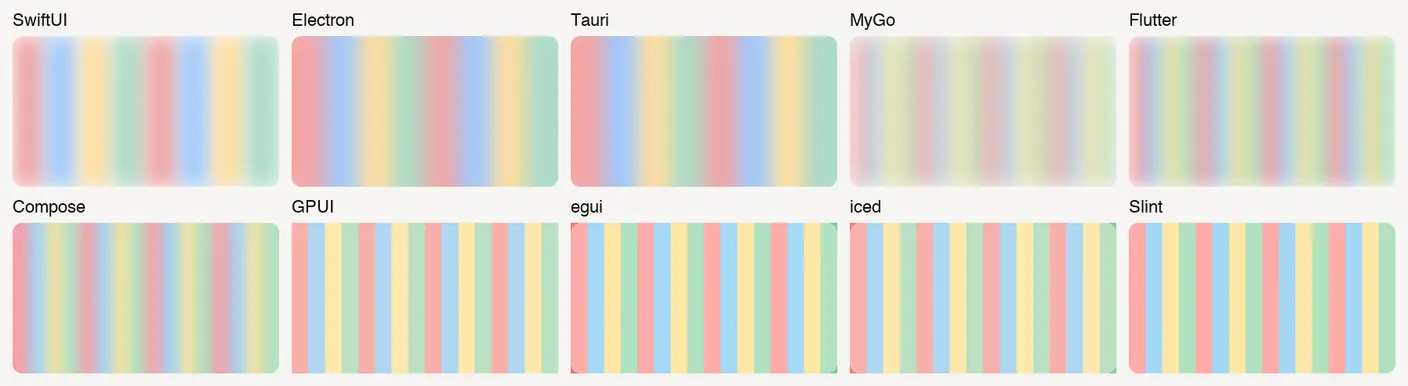
The GPUI, iced, egui and Slint test implementations applied a translucent overlay to the stripes. The stripe boundaries were still sharp in the retest. GPUI’s Blurred and iced’s window::Settings::blur affect content behind the window. We found no built-in drawing API for local backdrop blur in the tested versions. iced can render local effects with custom drawing, and egui can call into a renderer via PaintCallback. GPUI · iced window settings · egui paint callback
The Slint test used version 1.18.1 with FemtoVG. That version lacked the element-level backdrop-blur property. Upstream later added the property for its Skia renderer. The captures show the FemtoVG path in 1.18.1. Slint upstream issue
The design page has 11 checks. GPUI, egui, iced, Slint and Compose did not reproduce the P3 swatch in the tested Mac output. Windows captures lack a color profile, so P3 is not judged; flag emoji appear as letters in all tested Windows implementations.
| Framework | Layout | Text | Accessibility |
|---|---|---|---|
| GPUI | Taffy | CoreText on macOS | AccessKit |
| egui | Immediate-mode layout | epaint + harfrust | AccessKit |
| iced | Own flex layout | cosmic-text | No system bridge found |
| Slint | Compile-time lowering + runtime layout | Parley | AccessKit |
| Flutter | RenderBox constraints | SkParagraph | Semantics tree bridge |
| Compose | MeasurePolicy | SkParagraph via Skiko | Semantics; Java Access Bridge on Windows |
| Electron | Blink | Chromium text pipeline | Chromium accessibility tree |
| Tauri | System WebView | System WebView | Exposed via WebView |
| SwiftUI | Stack / Layout | TextKit,Core Text | Built into the system |
Layout approaches are converging. Text remains the biggest divide. When iced requested PingFang 700 on macOS, Latin letters fell back to Menlo Bold.
Limitations:
- Only one machine per platform. Motion results came from an Intel integrated GPU and may not apply to discrete GPUs.
- The Mac was not idle during testing. Frame data came only from application callbacks and is not compared across frameworks.
- Shadow blur semantics vary. egui, iced and GPUI use approximations. Editing controls are not equivalent either; GPUI uses a modified example editor.
- CPU and memory tables cover the app and included helper processes. WindowServer and driver costs are not allocated per window, and benefits from reusing shared system resources are not quantified; these tables cannot rank total system rendering costs.
- We did not obtain valid results for input-method candidate windows, the Mac accessibility tree or power consumption.